
Batch Rename
Pattern-based renaming with find & replace, sequential numbering, prefix/suffix, case conversion, and truncation. Preview every change before you commit.
Fourteen file management tools in one shell extension. Rename in bulk, encrypt, resize images, split, join, organize — all from the menu you already use every day.
Real tools, not gimmicks. Every entry below is one right-click away in Explorer after install.
Pattern-based renaming with find & replace, sequential numbering, prefix/suffix, case conversion, and truncation. Preview every change before you commit.
Password-protect files and folders straight from the context menu. Decrypt with one click. Files stay encrypted at rest — no cloud, no account.
Bulk-resize JPG, PNG, BMP, GIF, and TIFF. Add text or image watermarks. Build a browsable HTML album from any folder in seconds.
Slice large files into fixed-size chunks for easier sharing or storage. Reassemble them with a single right-click on any chunk — no helper app required.
Pull files out of nested folders, move them up one level, copy or move to a preset destination, and delete empty folder trees in one pass.
One command to auto-arrange desktop icons by name, type, or date. Clear the clutter without restarting Explorer.
Copy a full path, parent path, or just the filename to the clipboard. Forward slashes, back slashes, or UNC — configurable.
Produce a text or HTML listing of any folder with configurable columns — name, size, date, type, attributes. Great for inventory and documentation.
Use any selection — one file, a multi-select, or a whole folder. FilerFrog hooks the standard Windows shell, so the menu shows up everywhere you right-click.
Resize, encrypt, rename, split — jump straight to the action without switching apps. Submenus are organised by intent: Organize, Security, Rename, Images.
Results land in the same folder, the same project, the same workflow you were already in. No upload, no account, no cloud round-trip.
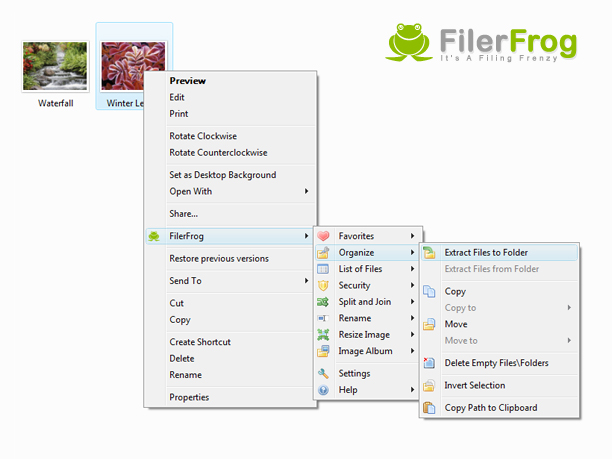
The complete FilerFrog menu, nested under the standard Windows context menu.
Independent takes on FilerFrog from around the web.
“A powerful yet free Windows Explorer extension for right-click file management.”Read the review ›
“Power up Windows Explorer in a 64-bit OS with this add-in.”Read the review ›
A single signed MSI. No bundled toolbars, no opt-out checkboxes.